MIA · WhatsApp

WhatsApp chatbot for car dealerships: one conversation, not another inbox

WhatsApp creates value when it connects customer requests to the sales process. If it becomes another inbox, it adds fragmentation. MIA covers first contact, gathers context and prepares a BDC handoff in the same flow.

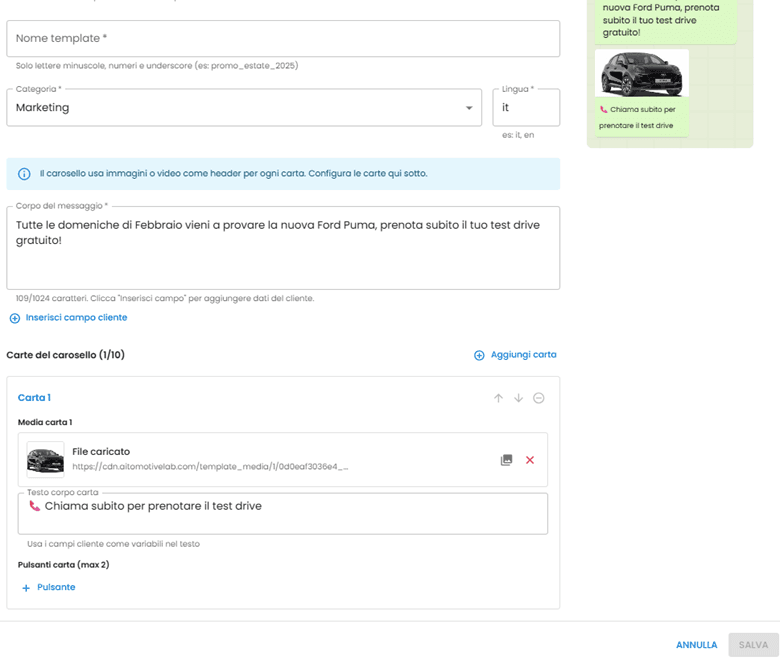
MIA outbound WhatsApp template editor with carousel and message preview
Outbound WhatsApp template: copy, carousel, and preview before sending.

Operational guide

7 operational workflows

Vehicle request, after hours, qualification, Human Control, test drive, Service and authorised follow-up. Checklists, ownership and Meta policy. This page stays commercial; the article is the work to configure.

  • Vehicle request
  • After hours
  • Qualification
  • Human Control
  • Test drive
  • Service and reminders
  • Authorised follow-up
Open the guide →
01

From message to commercial context

Customers ask about availability, price, trade-in or appointments in a few words. The agent must understand the vehicle and gather what matters without turning chat into a form.

MIA follows dealership rules and preserves the history for the team.

  • Vehicle or service identification.
  • Intent-aware qualification.
  • A clear next step.
  • Human escalation with context.
02

Inbound and follow-up on one channel

WhatsApp can handle spontaneous requests and continue authorized follow-up. MIA separates flows and applies approved WhatsApp Business templates and rules.

When the customer replies, the conversation becomes operational again and reaches the team when needed.

03

Appointments with human control

24/7 coverage does not remove the BDC. MIA gathers preferences and can propose calendar-connected slots while people handle complex requests.

Every handoff must remain traceable, and customers should know when they are interacting with automation.

04

CRM, inventory and team integration

An isolated chat creates more manual work. The flow becomes useful when authorized systems provide inventory, notes and lead status.

A MIA demo starts with those links: channels, required data, escalation rules and team ownership.

05

WhatsApp Coexistence: the phone app and MIA on one number

Your staff keep using the WhatsApp Business app on their phones. MIA runs on the API of the same number. Customers keep writing to the contact they already have.

When a salesperson replies from the phone, the message shows up in MIA and the AI steps back on that chat. No double replies.

Coexistence depends on the dealership’s Meta account. We check it before activation rather than assume it.

  • Phone app and AI on the same number.
  • Replies sent from the phone mirrored in MIA.
  • Several numbers with labels: sales, workshop.
  • Shared inbox: whoever takes the chat owns it.
How the app and AI share one number
06

Campaigns live on a separate page

This page covers chats the customer starts. Approved templates, CRM audiences, event-based journeys and send reports are on the WhatsApp marketing page.

See WhatsApp marketing for dealerships
WhatsApp Business FAQ

Policies, consent and channel control

What to verify before automating conversations and follow-up on WhatsApp.

Activation is designed for WhatsApp Business Platform, with checks for the number, consent, templates and conversation windows required by Meta policies. The final configuration depends on the dealership's approved account and integration.

It can manage authorized follow-up within the agreed process. Outside the conversation window, approved templates and WhatsApp Business rules apply; it is not designed for indiscriminate messaging.

Yes. Escalation rules define when the BDC or an operator takes over while retaining conversation history, vehicle interest and collected details.

Want to see MIA on WhatsApp Business?

We configure a demo around your flow: first request, qualification, appointment and BDC handoff.

Request a MIA demo